 chmonitor
DBA compare, TTL, and advisor workflows
Settings compare, schema compare, query/schema advice, TTL inventory, and Explorer DDL — recommend-only DBA workflows in the dashboard.
Operators coming from other DBA tools often look for schema compare, change plans, and TTL inventory. This page is the map of what ships today. All of it is recommend-only. Open any of these from the sidebar or ⌘K (title, route, or aliases such as ddl, schema diff, config diff, ttl inventory).
Recommend-only
chmonitor does not apply schema changes and does not edit config.xml (or any other ClickHouse server file). Advisor output is copyable SQL and settings you review and run yourself.
What exists today
| Workflow | Route | What it does |
|---|---|---|
| Settings compare | /settings-diff | Compares system.settings and system.merge_tree_settings across saved hosts (including per-user connections), or node vs node on the current cluster. Highlights values that differ and values changed from default. Export as CSV. One saved host compares against defaults; add a host to diff another node. Two or more hosts keep an all-hosts matrix with optional pair mode. |
| Schema compare | /schema-diff | Compares table DDL across saved hosts (including per-user connections), or node vs node on the current cluster. Recommend-only change plan (copy statements, never apply). Check differing tables to build a sync SQL script (or copy one table). One saved host shows an empty state (needs two connections, staging vs prod) plus a faded example of the table list and DDL pair. Add host uses the same dialog as the host switcher. |
| Query advisor | /advisor (Query Advisor tab) | Ranked skip-index, projection, partition-key, and PREWHERE recommendations for a pasted query or a query_id. Recommend-only. |
| Schema & settings lint | /advisor (Schema & Settings tab) | Scans a database (or one table) for column lint and table-level advice: TTL, PARTITION BY bloat, MergeTree vs Replicated on a cluster, missing Distributed wrappers, UUID-leading ORDER BY. Recommend-only. |
| TTL moves vs inventory | /storage-economics | Per-table compression, storage policies, and TTL storage move activity. Move history / current economics. |
| TTL and partition health | /ttl-partition-health | Inventory of MergeTree TTL and PARTITION BY, with partition and part counts plus a recommend-only next-step column (add TTL, coarsen partitions, check merges). Tables without TTL still appear. Recommend-only. |
| Health: TTL & Partition Health | /health | Same recommend-only rules as a Health card: count of flagged tables (500+ partitions, time-based key with no TTL, or merge backlog). Click the card for the per-table breakdown. Does not apply DDL. |
| Explorer DDL | /explorer | Shows the CREATE TABLE statement and schema for the selected host (?host=). Single-host, read-only. Schema lint on the table Overview tab. |
Settings compare (/settings-diff)
Open Tools → Settings Diff. Compare saved hosts (env, per-user, and browser connections), or pick two cluster nodes when the current host has 2+ replicas. Filter to rows that differ, or to settings changed from default. Search, column filters, sort, resize, reorder, and density live on the comparison table. One saved host compares against setting defaults; use Add host to diff another node. Two or more hosts keep an all-hosts matrix with an optional pair picker. The page is gated by the settings feature id — see Settings.
Nothing on this page writes to ClickHouse. To change a setting, use SET, ALTER TABLE … MODIFY SETTING, or edit the server config yourself.
Schema compare (/schema-diff)
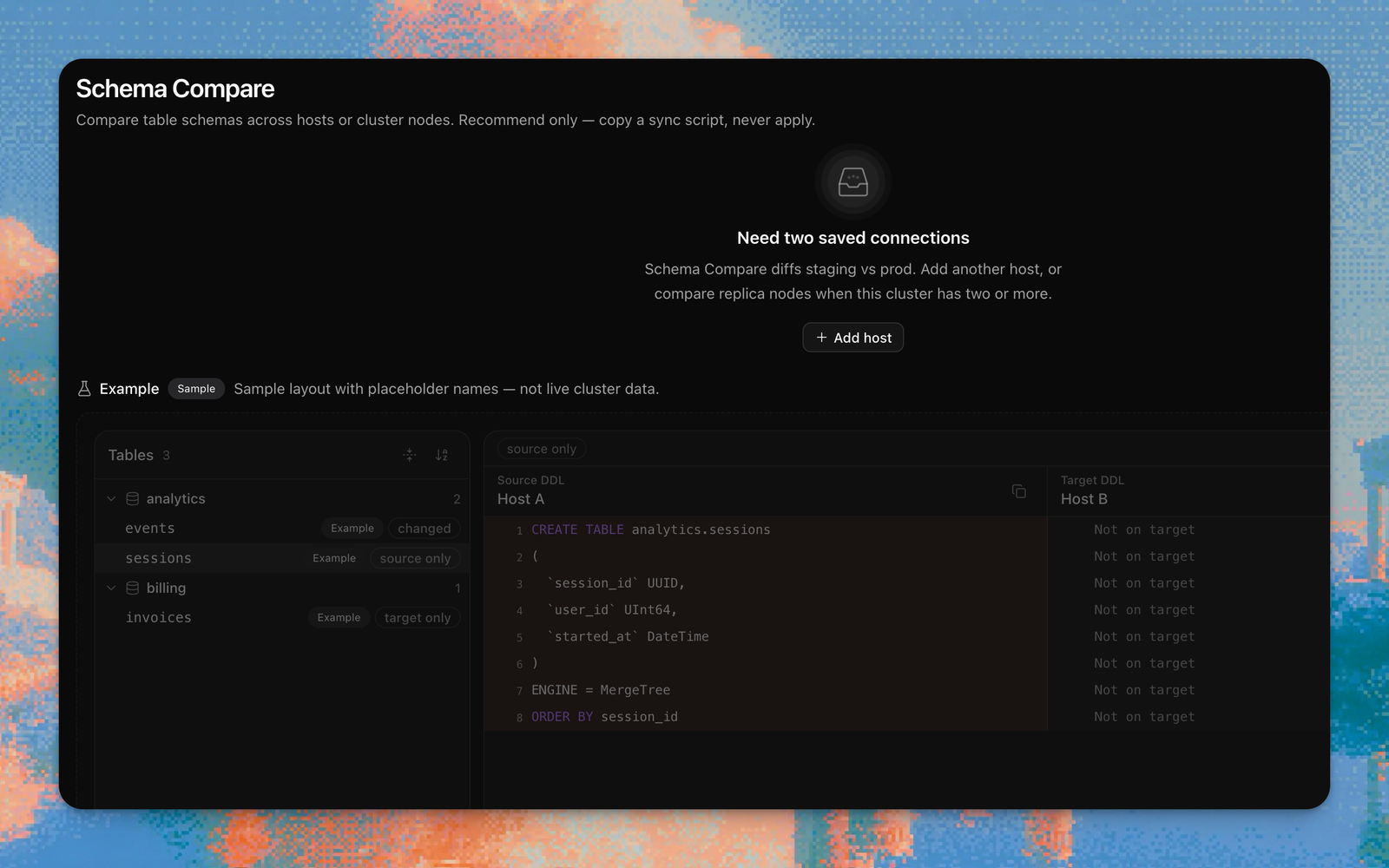
Open Tools → Schema Compare. Pick a source and target host (or two nodes of the current cluster) from the compact pair picker. With one saved host the page explains it needs two connections (staging vs prod) and offers Add host. Tables are grouped by database (collapse them into folders). Selecting a table pretty-prints side-by-side CREATE TABLE with line numbers and diff highlights, plus a copyable recommend-only plan. Copy recommended SQL lives on the source/target toolbar (all safe statements, or only tables you check). Each table's plan card can copy that table only. It never applies DDL.
Advisor (/advisor)
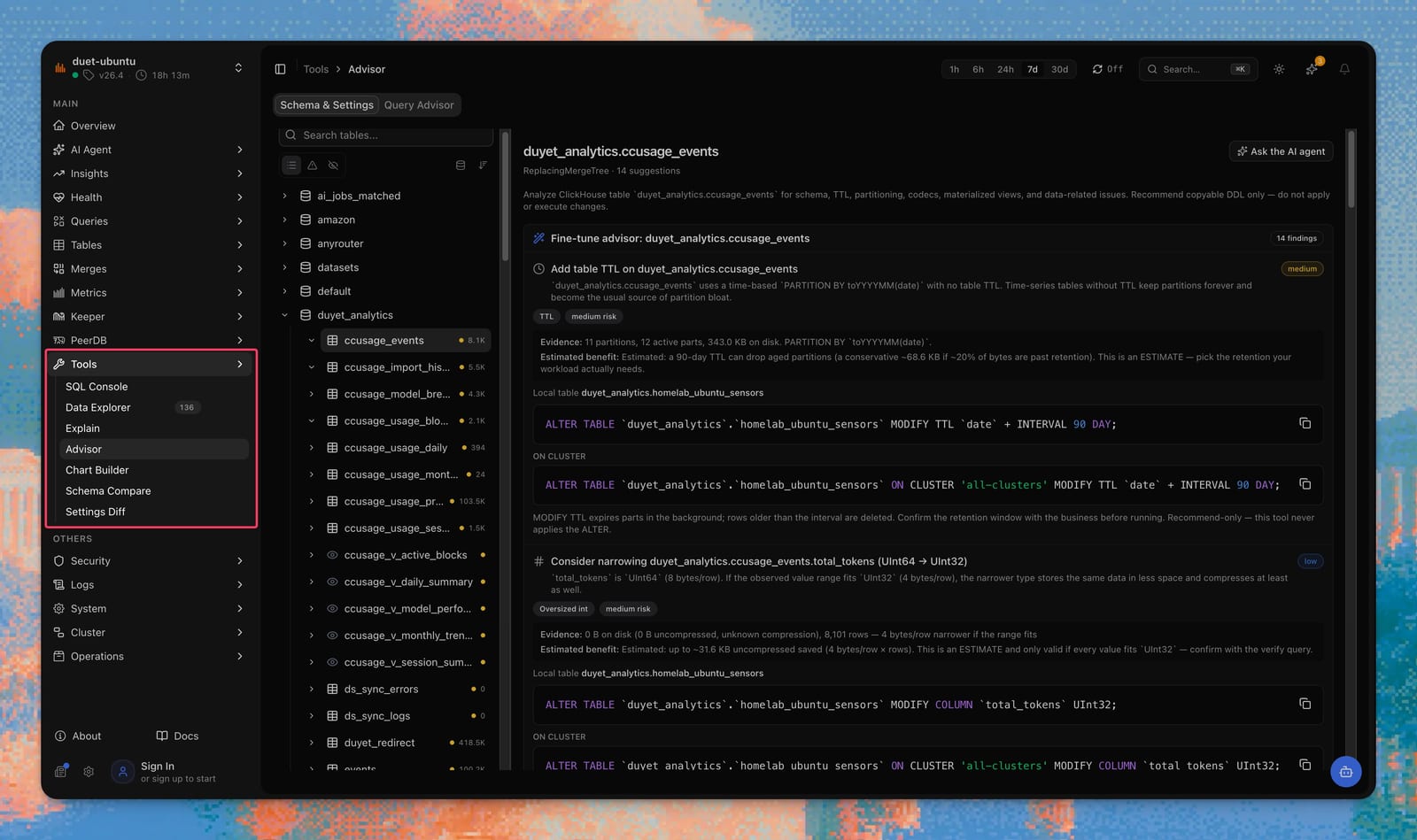
Open Tools → Advisor. Two tabs:
- Query Advisor — paste a
SELECTthat reads a table, pick a slow query (loads it and runs analysis), or look up aquery_idfromsystem.query_log. Table-less SQL such asSELECT 1is explained as "needs a table", not treated as a failed analysis. - Schema & Settings — scan a database or table for column lint, TTL / partition health, engine / Distributed pairing, and settings findings.
The same recommend-only engine is available from the AI agent and the MCP server. There is no Apply button.
Storage economics (/storage-economics)
Open System → Storage Economics. Three tables:
- Compression by table (from
system.parts) - Storage policies
- TTL storage moves (parts that already moved because of TTL)
The inventory of every table's TTL expression and partition health lives on
Tables → TTL & Partitions (/ttl-partition-health). That page also estimates
bytes still in the TTL window versus parts whose max_date is already past it
(recommend-only; it never DROP PARTITION). The same flags surface as the
TTL & Partition Health card on /health (count of flagged tables; click
for the breakdown). This page stays move history and current economics.
Health: TTL & Partition Health (/health)
Open Health. The TTL & Partition Health card counts MergeTree tables
that need review: 500+ partitions (warning) / 1000+ (critical copy on the
inventory page), a time-based PARTITION BY with no table TTL, or 10+ active
parts per partition. Click the card for the flagged-table breakdown, then
open TTL & Partitions for the full inventory. Recommend-only — there is
no Apply button and nothing here runs ALTER TTL or DROP PARTITION.
Explorer single-host DDL (/explorer)
The Data Explorer shows CREATE TABLE for the table on the current host. Table Overview also runs the same recommend-only schema lint as Advisor. Cross-host or node-vs-node DDL compare lives on /schema-diff.
Read-only explorer
The explorer cannot create, alter, or drop objects.
Related
Settings
Server settings pages, including Settings Diff.
Data explorer
Single-host DDL, columns, indexes, and projections.
Tables & storage
Table sizes, parts, TTL inventory, and replication pages.
Health
TTL & Partition Health card — flagged tables at a glance.
ClickHouse query optimization
The six areas the query advisor reasons about.
chmonitor v0.3.4
Tools, workspace roles, Schema Compare, Settings Diff, TTL inventory.
chm CLI
Install and use the chm / chmonitor CLI — local connections, dashboard API client, TUI, self-update, and zero-signup `chm doctor` against a cluster.
ClickHouse GRANT syntax: CREATE vs CREATE TABLE
The GRANT CREATE ON my_db.* vs GRANT CREATE TABLE form, ON CLUSTER, SHOW GRANTS, and least-privilege recipes for app vs monitoring users.