 chmonitor
AI Agent
The AI Agent turns natural language into ClickHouse insights using read-only tools, expert skills, and plan-and-verify reasoning.
The AI Agent turns natural language into ClickHouse insights. Ask a question and the agent plans a series of read-only tool calls — querying system tables, inspecting schema, comparing hosts, spotting anomalies — then streams back a concise answer with optional inline charts.
The agent connects through the same ClickHouse host and user as the rest of the dashboard. Its visibility is bounded by the grants on that user. By default it only runs read-only queries. Keep control tools off and use a restricted ClickHouse user for safe exposure.
What it can do
| Category | What the agent covers |
|---|---|
| Schema exploration | List databases, tables, columns; explore tables relevant to a topic |
| Query analysis | Running, slow, failed, and expensive queries; normalized slow query patterns; EXPLAIN plans; pre-flight cost estimates; optimization advice |
| System health | Server metrics, disks, errors, anomaly detection |
| Storage, merges & mutations | Part sizes, active merges, stuck mutations, merge throughput |
| Replication & cluster | Replication lag, queue, ZooKeeper/Keeper status, cluster topology |
| Schema & data-type advice | ORDER BY/keys, codecs, skip indexes, column type right-sizing |
| Tuning & upgrades | Hardware-based settings, version-upgrade guidance |
| Charts & visualization | Run SQL and render an interactive chart inline |
| Cross-source Postgres (opt-in) | Read-only SELECT, health metrics, slow-query patterns, and per-table stats against a Postgres source, correlated with ClickHouse in one conversation |
| PeerDB mirrors (opt-in) | Worst-first fleet status plus per-mirror detail (rows synced, table counts, batches, errors) from the read-only PeerDB proxy |
A small set of tools delivers this: dedicated primitives for the common reads, and the query tool plus an expert skill recipe for everything else. See Capabilities for the full list.
Cross-source Postgres — with CHM_FEATURE_POSTGRES_SOURCE=true and one or more Postgres sources configured via the POSTGRES_* env lists (POSTGRES_HOST, POSTGRES_PORT, POSTGRES_USER, POSTGRES_PASSWORD, POSTGRES_DATABASE, POSTGRES_SSLMODE, POSTGRES_NAME), the agent also gains read-only Postgres tools — run_postgres_select_query, get_postgres_metrics (version/uptime, connection saturation vs max_connections, cache hit ratio, transactions/deadlocks, size, replication), list_postgres_slow_query_patterns (pg_stat_statements), and get_postgres_table_stats (dead-tuple bloat, last autovacuum/analyze, unused indexes) — that take a pgHostId (an index into those lists). It can then query ClickHouse and Postgres in the same conversation and correlate the results. Off by default; see Configuration.
PeerDB mirrors — with CHM_FEATURE_PEERDB_AGENT=true and PEERDB_API_URL configured (see PeerDB), the agent gains get_peerdb_mirror_status: no arguments for a worst-first fleet overview (failed > non-running > highest lag), or a mirrorName for one mirror's state, rows-synced total, per-table counts, recent batches, and recent errors. It reads the same read-only server-side PeerDB proxy as the /peerdb pages — fixed endpoints only, credentials stay server-side, mirror configs stripped. Off by default; see Configuration.
Skills — when a question needs domain depth, the agent loads a bundled expert guide (a skill) with copy-pasteable SQL recipes before answering. Eighteen skills cover data analysis, anomaly detection, query tuning, schema & data-type design, hardware tuning, version upgrades, concept explanations, incident response, plan-and-verify, and the core domains (replication, cluster, storage, migration, security, best practices, troubleshooting, system tables). Available skills: GET /api/v1/agent/skills.
Plan and verify — for investigations that need 3 or more steps the agent may author a live checklist with update_plan. Simple one-step questions skip the plan. The tool loop stops after 16 steps. See Capabilities for details.
Quick start
Set at minimum one environment variable:
LLM_API_KEY=your-provider-keyThen open /agents in the dashboard, pick a host, and start asking questions. The agent uses OpenRouter by default (https://openrouter.ai/api/v1) with the free model tier.
For full configuration options see Configuration.
Agent Settings page
/agents/settings is the full-page home for everything agent-related, reached
from the sidebar under AI Agent → Agent Settings (or the "Open full agent
settings" link in the chat page's settings panel). It groups four tabs:
- Provider & Models — a provider → model hierarchy: each configured
provider (AnyRouter, OpenRouter, NVIDIA NIM) is grouped with its models,
showing configured/not-configured status (
GET /api/v1/agents/config-check), context size, max output tokens and per-token pricing where available, and free/default/custom badges. Click a model to make it the active model for new conversations — the same picker used on the chat page and its sidebar. Provider/model access and API keys are still set via environment variables at deploy time (see Configuration); this tab requires being signed in on deployments where theagentfeature needs authentication (it shows a sign-in prompt rather than an error for an anonymous visitor). - System prompt — read-only view of the instructions sent to the model on every request; there is no per-user override yet.
- Skills — the full skill library with search and per-skill toggles.
- MCP servers — split into the always-on built-in chmonitor MCP
server (self-access to this cluster; links to the full MCP server
guide) and the external MCP servers you register
yourself (see Persistent MCP server registry
below). This replaces the old standalone
/mcp-serverspage, which now redirects to/agents/settings?tab=mcp.
Bring your own key (BYOK)
On the hosted (Cloud) product the AI advisor normally runs on chmonitor's
included AI credits, which are metered per plan (a daily message allowance plus a
monthly spend budget). You can instead bring your own model-provider API key:
send it as the apiKey field on the agent request (POST /api/v1/agent) and the
request runs against your provider account instead.
When a valid BYOK key is supplied:
- The key overrides the deployment's provider key for that request only. It is never persisted and never logged — it is forwarded to the provider for the single request and then discarded.
- chmonitor skips its own included-credit metering entirely — no daily reservation, no monthly budget check, no overage. Your usage is billed by your provider, not by chmonitor.
- BYOK works on any plan (Free / Pro / …), so you can keep using the advisor past the included daily allowance by paying your provider directly.
Self-hosted (OSS) deployments are unaffected — they already run on their own
LLM_API_KEY with no metering. BYOK simply lets a Cloud user do the same
per-request.
Guest (anonymous) credits — Cloud only
Anonymous visitors on the hosted product can use the agent against the public
demo. They get a smaller daily message cap than signed-in Free (default 3,
CHM_GUEST_AI_REQUESTS_PER_DAY) and a tighter per-minute rate limit
(default 5, RATE_LIMIT_AGENT_GUEST_PER_MIN) so the shared provider key cannot
be burned. Usage is tracked in the same D1 ai_usage_daily table, keyed by a
per-visitor guest:<ip-hash> id — not a single global guest bucket. Sign in
to get the plan allowance (Free 5 / Pro 100 / …). Guests are limited to
anyrouter:auto and the anyrouter/free aliases; any other model (or none) is
forced to anyrouter:auto by the server. anyrouter:auto picks the top
tool-capable model by usage, skipping models AnyRouter serves only through BYOK
upstreams (the shared key cannot route them); if none qualify it falls back to
the curated default. Self-hosted / OSS is unchanged
(no guest gate).
Child pages
Capabilities
Full tool list, skills, plan & verify mode, and worked examples.
Configuration
All environment variables, LLM providers, and access control.
Conversation History
How chat history works and how to enable server-side persistence.
Store Backends
Per-backend setup: D1, ClickHouse, Postgres, AgentState, and more.
Conversation history backends
Agent chat history is persisted by a server-side ConversationStore chosen at deploy time by environment variables. Four backends are available:
| Backend | Selected when | Notes |
|---|---|---|
| Browser | conversation-DB feature flag off | localStorage only; history is per-browser, no server setup |
| AgentState | AGENTSTATE_API_KEY is set | Managed or self-hosted conversation-history service; optional AI enrichment |
| D1 | a Cloudflare D1 binding is present | Cloudflare-native SQLite |
| Postgres | DATABASE_URL is set | Any PostgreSQL-compatible database |
Selection priority when persistence is enabled: AgentState (if AGENTSTATE_API_KEY) → D1 (Cloudflare binding) → Postgres (DATABASE_URL) → Memory (last-resort, non-persistent). With the feature flag off, history stays in the Browser.
Server persistence requires CHM_FEATURE_CONVERSATION_DB=true and an authenticated user — configure Clerk (CHM_AUTH_PROVIDER=clerk + CLERK_SECRET_KEY) so history can be scoped per user. Unauthenticated sessions always fall back to browser history. See Authentication.
AgentState
AgentState is a conversation-history database-as-a-service for AI agents. Use it when you want managed (or self-hosted) persistence that survives browser clears and is shared across devices, plus optional AI enrichment — auto-generated conversation titles and follow-up question suggestions — and per-project analytics. It is self-hostable as a single Cloudflare Worker (see duyet/agentstate) and ships an npm SDK (@agentstate/sdk).
Per-user isolation is built in: each thread is namespaced by AgentState external_id as <userId>:<conversationId> and tagged user:<userId>, so one project key safely holds every user's history without cross-talk.
Environment variables (all server-side):
| Variable | Required | Default | Purpose |
|---|---|---|---|
AGENTSTATE_API_KEY | to enable | — | as_live_... project key; its presence activates the AgentState backend |
AGENTSTATE_BASE_URL | no | https://agentstate.app/api | endpoint; override to point at a self-hosted instance |
AGENTSTATE_AI_ENRICH | no | false | enable auto-title + follow-up suggestions |
CONVERSATION_STORE_BACKEND | no | auto | force agentstate when a Cloudflare D1 binding is also present |
Still requires CHM_FEATURE_CONVERSATION_DB=true and a Clerk auth provider (CHM_AUTH_PROVIDER=clerk + CLERK_SECRET_KEY).
Setup (hosted)
- Sign in at agentstate.app and create a project.
- Create an API key — it is prefixed
as_live_and shown once, so copy it immediately. - Set it server-side:
CHM_FEATURE_CONVERSATION_DB=true
AGENTSTATE_API_KEY=as_live_xxxxxxxxxxxxxxxxxxxxxxxxxxxxxxxxxxxxxxxx
# Optional: turn on auto-titles + follow-up suggestions
AGENTSTATE_AI_ENRICH=true
Setup (self-host)
Run your own AgentState Worker per duyet/agentstate, then point the dashboard at it:
CHM_FEATURE_CONVERSATION_DB=true
AGENTSTATE_API_KEY=as_live_your_self_hosted_key
AGENTSTATE_BASE_URL=https://your-agentstate-host/api
Local dev
Against a locally running AgentState instance, use the seed test key:
CHM_FEATURE_CONVERSATION_DB=true
AGENTSTATE_BASE_URL=http://localhost:8787
AGENTSTATE_API_KEY=as_live_TEST_KEY_FOR_LOCAL_DEV_ONLY_1234567890ab
Verify it's active
- Settings sidebar — the agent settings sidebar shows a read-only Conversation History section naming the active backend (e.g.
AgentState). - Endpoint —
GET /api/v1/conversations/backendreports the active backend and whether enrichment is available:
curl https://your-host/api/v1/conversations/backend
# => { "backend": "agentstate", "supportsAiEnrichment": true }
AI enrichment
When AgentState is active and AGENTSTATE_AI_ENRICH=true:
- Auto-title — new conversations get a concise generated title instead of a placeholder.
- Follow-ups — the chat suggests follow-up questions after a turn. The dashboard reads them from
GET /api/v1/conversations/$id/follow-ups.
With enrichment off, conversations persist normally but titles and follow-up suggestions are not generated.
AI Insights persistence
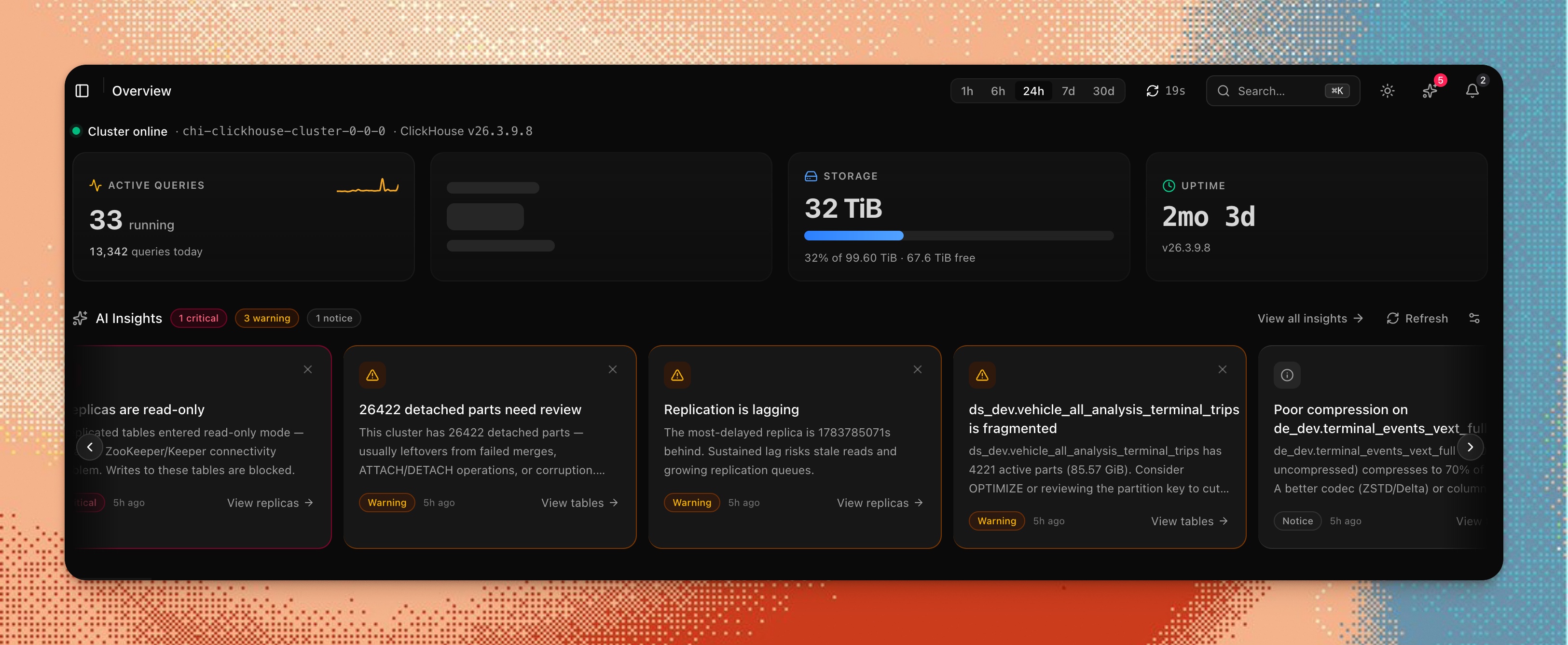
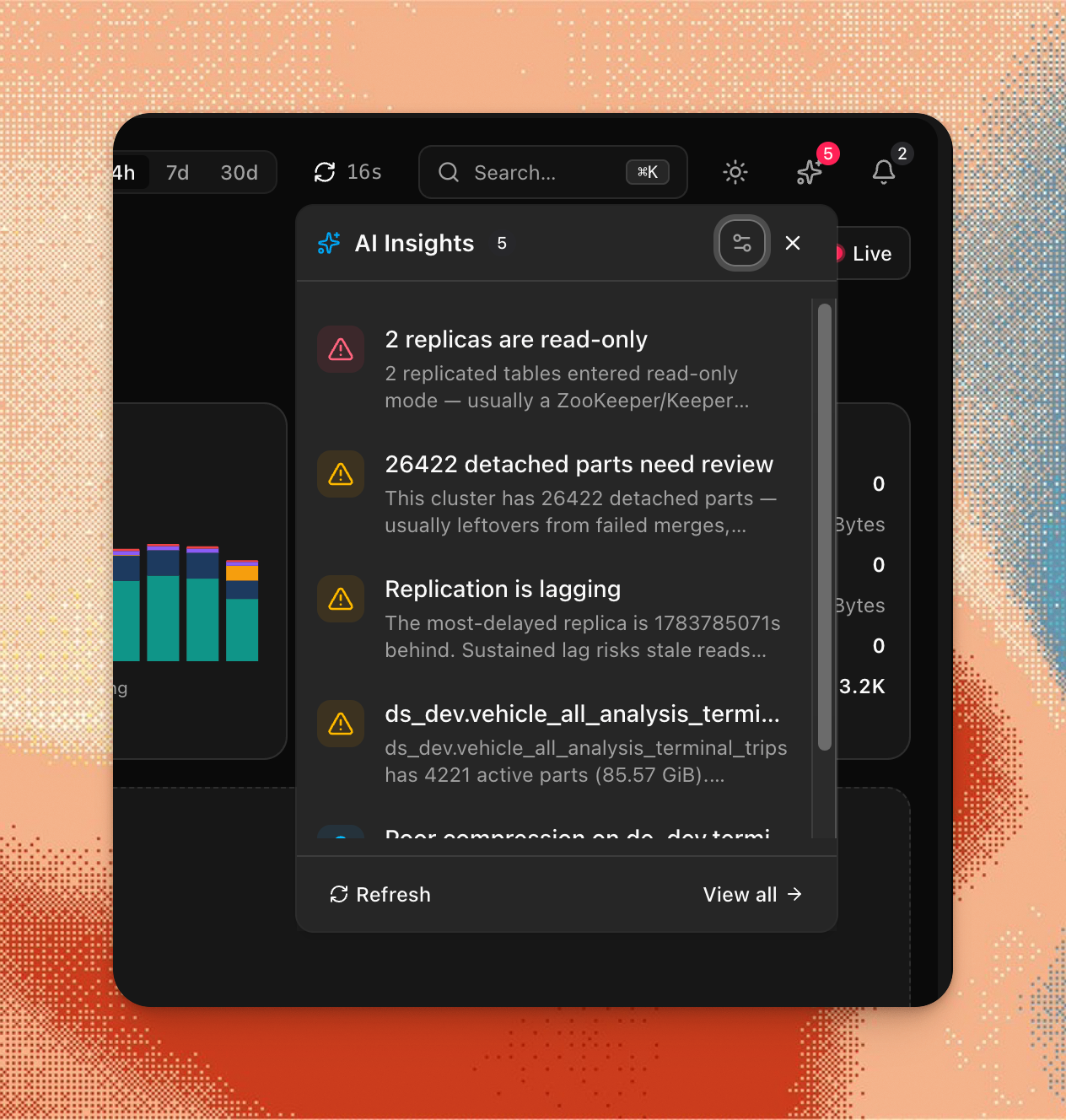
New findings also surface in the header AI Insights panel, so critical and
warning insights reach you from any page without opening /overview:
Separate from chat history, the AI Insights panel on /overview persists the
short observations it generates through its own pluggable store, mirroring the
conversation backends above. It is additive opt-in via one env var and
defaults to ClickHouse, so existing deployments are unaffected.
INSIGHTS_STORE_BACKEND=auto # auto | clickhouse | d1 | postgres | agentstate | memory| Value | Backend | Prerequisite |
|---|---|---|
auto (default) | ClickHouse monitoring_findings table | writable monitoring connection |
clickhouse | same as auto | writable monitoring connection |
d1 | Cloudflare D1 insights_findings table | INSIGHTS_D1 binding, else CHM_CLOUD_D1 |
postgres | Postgres insights_findings table | DATABASE_URL |
agentstate | AgentState State store | AGENTSTATE_API_KEY (+ optional AGENTSTATE_BASE_URL) |
memory | in-process (ephemeral) | — |
The D1, Postgres, and AgentState backends reuse the same env / bindings as the
conversation store. auto resolves to ClickHouse and never silently follows
other env; if an explicitly selected backend is missing its prerequisite, the
engine logs a warning and falls back to ClickHouse. GET /api/v1/insights/backend
reports the active backend ({ "backend": "d1" }), and the overview panel shows
a read-only "Stored in <backend>" footer.
HTTP API
curl -X POST https://your-host/api/v1/agent \
  -H "Content-Type: application/json" \
  -H "Authorization: Bearer $AGENT_API_TOKEN" \
  -d '{"message": "Which queries are running right now?", "hostId": 0}'
hostId is a zero-based numeric index; defaults to 0.
Page context (optional). The dashboard chat sends an optional
pageContext: { route, label? } field grounding an ambiguous question in the
page the user was on when they sent it (e.g. "the user is currently viewing
the Merges page"). It's only included on the first message of a new thread, or
when the page changed since it was last sent — never on every turn, so a
long-running conversation doesn't keep asserting stale context after the user
navigated away. It's threaded in as its own message ahead of the user's turn,
not baked into the (byte-stable, cached) system prompt. Purely additive:
omitting it (MCP and API-token callers have no "page") behaves exactly as
before.
In the floating chat widget this awareness is made visible: a small chip
above the composer (e.g. ⌞ Fleet Overview) shows which page the agent can
see, so "why is this slow?" is understood as this page. Click the chip's ×
to drop page context for the current page (it re-arms when you navigate
elsewhere). The chip is a floating-widget affordance only — the full
/agents page has no "current page" and shows no chip.
Floating vs docked layout. The floating widget can be expanded from the
small bottom-right popover into a full-height right-hand sidebar (and collapsed
back) via the header toggle. The preference is remembered per browser
(localStorage clickhouse-monitor-agent-widget-mode).
MCP Server
The dashboard exposes an MCP (Model Context Protocol) endpoint at /api/mcp. The same implementation runs in the standalone Cloudflare MCP Worker (apps/mcp). All tools are read-only by design — write and DDL statements are rejected.
Agent settings sidebar
The MCP Servers section of the agent settings sidebar shows the built-in clickhouse-monitor server with its live connection status, tool count, resource count, and version — fetched from GET /api/v1/mcp/info. Click a server row to see the full tool and resource list. The built-in server is always enabled and cannot be toggled off.
Custom MCP servers
You can connect additional MCP servers from the agent settings sidebar. Click Connect new server, enter a name and endpoint URL, and save. Enabled custom servers are connected at the start of each agent request — their tools become available to the model for that conversation.
How tools are named. Each tool from a custom server is prefixed mcp_<server-name>_<tool-name> (server name is lowercased and non-alphanumeric characters replaced with _, truncated to 20 chars). This keeps custom tools distinct from built-in ones.
Requirements and limits:
- Endpoint URL must use
https:.http:is allowed only forlocalhost/127.0.0.1/[::1](local development). - Private IP ranges are blocked (10.x, 172.16–31.x, 192.168.x, 127.x, 169.254.x). This includes the AWS/GCP instance metadata endpoint (
169.254.169.254). - At most 5 custom servers are connected per request. Extras are skipped.
- Each server has an 8-second connect timeout. A failing server does not affect other servers or the built-in tools.
The panel probes each enabled server on load (POST /api/v1/mcp/probe) to show live connection status and tool count. Click a row to see the full tool list.
Persistent MCP server registry (per-user)
The sidebar panel above stores servers in the browser (localStorage). For servers that persist server-side per user — with authentication and a template library — use the MCP Servers tab on the Agent Settings page (/agents/settings?tab=mcp, in the sidebar under AI Agent → Agent Settings). The old standalone /mcp-servers route redirects here.
- Register a server with a name, endpoint URL, transport (
httpstreamable orsse), and optional auth (a bearer token or a custom header). Saving first runs a Test connection probe and stores the server only if it connects — so the tool count shown reflects what the server actually advertised. - Template library — one-click presets prefill the form for Firecrawl (no key), Slack, GitHub, and Datadog. Firecrawl scrape/search/parse work without a token; add a bearer API key on the same URL for crawl/map/agent and higher limits. Other templates still need your token.
- Web research sources (Alexandria) — not built in, because finance, shopping and review sources are outside ClickHouse monitoring and every built-in tool adds to each conversation's prompt. They are served from
https://mcp.firecrawl.dev/v2/mcp-search, which requires a Firecrawl OAuth sign-in (an anonymous request returns401 invalid_token). This registry supports bearer tokens and custom headers but not OAuth yet, so that endpoint cannot be registered today. - Enable / disable / remove each server. Enabled registrations are loaded for that user at the start of every conversation, merged with any request-body (sidebar) servers and de-duplicated by endpoint.
- Live connection status — each row re-probes the server (with its stored, decrypted auth) and shows connected / unreachable, not just the last manual "Test connection" timestamp.
- Storage — registrations live in Cloudflare D1 (
mcp_server_registrations), strictly scoped to the signed-in user; one user's servers are never loaded for another. Auth secrets are encrypted at rest (AES-256-GCM) and never returned by the API. - SSRF-guarded transport — the same private-range / DNS-rebind guard as above applies, and the actual outbound connection is pinned behind the host-validated fetch (not a raw fetch), so the validated address is the one connected to.
- Availability — this page requires the hosted (cloud) deployment (a D1 binding + a signed-in account). Self-hosted deployments without D1 use the sidebar panel instead; the page shows an explanatory empty state.
- Built-in Firecrawl MCP — every agent conversation also connects
https://mcp.firecrawl.dev/v2/mcpwith no API key (mcp_firecrawl_*tools). Keyless scrape/search/parse are rate-limited. SetCHM_AGENT_FIRECRAWL_MCP=falseto turn it off. Optionally restrict scrape/crawl/map URLs withCHM_AGENT_FIRECRAWL_ALLOW_DOMAINS(comma-separated hostnames; empty / unset = unrestricted). Register the same URL with a bearer token (or pick the Firecrawl template) to override the built-in server and unlock the full tool set. OAuth is not implemented yet.
API: GET/POST/PATCH/DELETE /api/v1/mcp/servers (all user-scoped); POST /api/v1/mcp/probe for test-before-save; POST /api/v1/mcp/servers/$id/probe for the live status of an already-registered server.
MCP tools
The MCP server exposes a smaller, read-only-only subset of tools for external MCP clients — not the full agent toolset. For the complete tool list the in-app AI Agent uses (schema, query analysis, health, storage, replication, merges, capacity planning, the query advisor, aggregation/MV advisor, planning, skills, tool discovery, visualization, insights, reports, and dashboard suggestions — 31 tools total, plus 3 env-gated control tools, 4 env-gated cross-source Postgres tools, and 2 env-gated PeerDB tools), see Capabilities.
| Tool | Purpose |
|---|---|
query | Execute a read-only SQL query (SELECT / WITH / DESCRIBE / EXPLAIN only). Results are capped at 1000 rows (truncated: true + a note when hit). |
list_databases | List all databases with their engines and comments |
list_tables | List tables in a database with row counts and sizes. Results are capped at 1000 rows (truncated: true + a note when hit). |
get_table_schema | Get column definitions for a table including types, defaults, and comments |
get_metrics | Key server metrics: version, uptime, active connections, memory usage |
get_running_queries | Currently running queries ordered by elapsed time |
get_slow_queries | Slowest completed queries from the query log |
get_merge_status | Currently running merge operations with progress and elapsed time |
explore_table_schema | Three-mode schema exploration: databases → tables → full schema with relationships. Each list (databases, tables, columns, dependencies) is capped at 1000 rows (truncated: true + a note when hit). |
analyze_performance | Structured performance snapshot — slow queries, high part counts, merge backlog, memory/disk pressure — with severity ratings |
get_optimization_recommendations | Analyze a slow query (by queryId or raw sql) and return ranked skip-index/projection/partition-key/PREWHERE recommendations with DDL, risk, effort, and an estimated impact — recommend-only, never executed |
get_tuning_suggestions | Scan a database (or one table) for ranked schema lint findings — needless Nullable, oversized integers, compression-codec opportunities, LowCardinality candidates (ranked by on-disk bytes), table-level TTL / PARTITION BY / engine / Distributed / ORDER BY advice, plus server/merge-tree settings that differ from defaults in risky ways. Each finding carries evidence (bytes/rows/ratios), an estimated benefit, ready-to-review DDL, and a verification query — recommend-only, never executed |
Read-only enforcement
The query tool — the only tool that accepts arbitrary SQL — validates every statement before execution via validateSqlQuery (@chm/sql-builder). It throws on any write or DDL statement and on dangerous ClickHouse commands. Allowed prefixes: SELECT, WITH (CTE), DESCRIBE, EXPLAIN. Rejected: INSERT, ALTER, DROP, CREATE, TRUNCATE, RENAME, DELETE, UPDATE, SYSTEM RELOAD/FLUSH/KILL/SHUTDOWN, GRANT, REVOKE, ATTACH, DETACH, KILL, SET, multi-statement payloads (; chaining), and dangerous table functions (remote(), url(), s3(), etc.).
All other MCP tools run fixed SELECT queries and pass readonly: '1' to the ClickHouse connection — they cannot issue writes regardless of the validator.
Result size caps
The freeform-SQL tools (query in both the in-app agent and the MCP server, plus the agent's query_and_visualize) cap results to 1000 rows before serializing them back to the model. The SQL itself is never rewritten (no LIMIT injection); a query that returns more than the cap comes back with only the first 1000 rows, truncated: true, and a note telling the model to add its own LIMIT or aggregation to see the full result set. Queries at or under the cap are unaffected (truncated: false, no note).
Dedicated (fixed-query) tools cap independently rather than relying on the model to add a LIMIT: the in-app agent's list_tables/explore_table_schema inject a SQL LIMIT 500, while the standalone MCP server's list_tables and explore_table_schema reuse the same post-fetch capResultRows/truncationNote helpers as its query tool, capping each returned list (databases, tables, columns, upstream/downstream dependencies) at 1000 rows with the same truncated/note shape.
Agent Discovery & RFC Compliance
chmonitor conforms to modern agent-discovery standards, allowing AI agents to automatically locate services, APIs, and documentation.
Discovery Metadata Endpoints
The dashboard exposes the following standardized .well-known endpoints at the domain root:
- Link Headers (RFC 8288): The homepage
/and/overviewrespond withLinkheaders pointing to the API Catalog and the MCP Server Card. - API Catalog (RFC 9727):
GET /.well-known/api-catalogreturns linkset JSON (application/linkset+json) describing the/api/v1base URL, OpenAPI descriptor (GET /api/v1/openapi.json, public), health endpoint, and documentation (https://docs.chmonitor.dev/reference/api). - OAuth Protected Resource (RFC 9728):
GET /.well-known/oauth-protected-resourcereturns protected resource metadata for/api/v1. - OAuth Authorization Server (RFC 8414):
GET /.well-known/oauth-authorization-serveradvertises issuer endpoints and includes theagent_authconfiguration for agent registration. - OpenID Connect Discovery:
GET /.well-known/openid-configurationreturns OIDC discovery metadata. - MCP Server Card (SEP-1649):
GET /.well-known/mcp/server-card.jsonadvertises the built-in MCP server info, capabilities, and the transport endpoint (/api/mcp). - Agent Skills Index:
GET /.well-known/agent-skills/index.jsonindexes all expert ClickHouse-domain agent skills (type: "skill-md") with their SHA-256 digests. Individual skill contents are readable under/.well-known/agent-skills/:name/SKILL.md. - Auth.md instructions:
GET /auth.mdserves markdown instructions for agent authentication and registration.
Content Negotiation (Markdown for Agents)
When an AI agent requests any frontend route (e.g. / or /overview) with the header Accept: text/markdown, chmonitor returns a clean, token-optimized Markdown summary of the page and features (using Content-Type: text/markdown and including x-markdown-tokens). Browser requests without the markdown accept header still receive normal HTML.
DNS for AI Discovery (DNS-AID)
To advertise your chmonitor instance to AI agents at the DNS level, publish a DNS-AID record under your domain.
For example, add an HTTPS / SVCB DNS record at _index._agents.yourdomain.com:
_index._agents.yourdomain.com. IN HTTPS 1 yourdomain.com. (
    alpn="h2,http/1.1"
    port="443"
)
Ensure the DNS zone is signed with DNSSEC so validating resolvers can authenticate the discovery records.
Security
Security guidelines
- Use a read-only ClickHouse user scoped to the system tables the dashboard needs.
- Keep control tools off (
AGENT_ENABLE_CONTROL_TOOLS=false, the default) unless you trust the user and need kill/optimize. - On public deployments, require authentication:
CHM_FEATURE_AGENT_ACCESS=authenticated. - Keep LLM keys server-side — never in
VITE_*variables (those are baked into browser JS at build time).
Least-privilege ClickHouse user for the agent/MCP
The risk. The agent's query tool and the MCP server's query
tool both accept arbitrary read-only SQL (SELECT / WITH / DESCRIBE /
EXPLAIN) and run it with whatever CLICKHOUSE_USER is configured for the
connection — see Read-only enforcement. The validator
gates the statement type, not the tables it touches, so a query like
SELECT * FROM system.query_log or SELECT * FROM system.users passes
validation as long as the configured user has grants on those tables. Two
system tables deserve special attention:
system.query_log— stores the full text of every query the server has run, including queries issued by other tools, users, or services. If any of those queries ever embedded a connection string, password, or token in a SQL comment or string literal, it is sitting in plaintext in this table and is readable through the agent.system.users— exposes configured usernames, auth types, and (on some ClickHouse versions/configurations) additional auth metadata.
Because the agent is LLM-driven and, by default (CHM_FEATURE_AGENT_ACCESS=public),
reachable without authentication on self-hosted deployments, anyone who can
prompt it inherits read access to everything the configured ClickHouse user can
see — including secrets that leaked into query text.
The recommendation. Create a dedicated, restricted, read-only ClickHouse user for the dashboard/agent/MCP connection instead of reusing an admin or broad-access account — for both self-hosted deployments and any custom/BYO ClickHouse connection configured in cloud mode:
CREATE USER chmonitor_agent IDENTIFIED WITH sha256_password BY 'CHANGE_ME'
    SETTINGS readonly = 1;

-- Grant only the system tables the dashboard needs for monitoring.
GRANT SELECT ON system.processes TO chmonitor_agent;
GRANT SELECT ON system.metrics TO chmonitor_agent;
GRANT SELECT ON system.parts TO chmonitor_agent;
GRANT SELECT ON system.replicas TO chmonitor_agent;
GRANT SELECT ON system.merges TO chmonitor_agent;
-- ... plus any other system.* tables your dashboard pages use.

-- Explicitly withhold the sensitive ones unless you've reviewed what's
-- in your query text / user list and accept the risk:
REVOKE SELECT ON system.query_log FROM chmonitor_agent;
REVOKE SELECT ON system.query_thread_log FROM chmonitor_agent;
REVOKE SELECT ON system.users FROM chmonitor_agent;
REVOKE SELECT ON system.session_log FROM chmonitor_agent;
Adjust the exact grant list to your environment — the key principle is least
privilege, readonly = 1, and treating system.query_log / system.users as
sensitive by default.
Weighing the trade-off. Several dashboard query-monitoring pages —
Slow Queries, Expensive Queries, the query-history panel, and the Query Detail
view — legitimately read system.query_log to power their own charts and
tables. If your monitoring use case needs that access, weigh it against the
agent's ability to read the same table through the same connection. Two
options:
- Split the connection — the dashboard, agent, and MCP server currently
share one
CLICKHOUSE_USER/CLICKHOUSE_HOSTconnection, so achieving a split means running a second chmonitor deployment (or a separate host entry) configured with its own, more restricted ClickHouse user — one that revokessystem.query_log/system.users— dedicated to agent/MCP traffic, while the primary connection keeps broader access for the dashboard's own charts. - Accept the risk — keep one shared user, but understand that anyone who
can prompt the agent (or call
/api/mcp) inherits the same read access as the dashboard's own query-monitoring pages, and gate access accordingly (CHM_FEATURE_AGENT_ACCESS=authenticated, MCP auth viaCHM_API_KEY_SECRET/ Clerk — see MCP Server).