 chmonitor
PeerDB
Monitor PeerDB replication mirrors and peers from within chmonitor — read-only, proxied, no direct database access required.
Monitor PeerDB replication mirrors and peers without leaving chmonitor — an optional, read-only integration that proxies the PeerDB API server-side.
Prop
Type
What it does
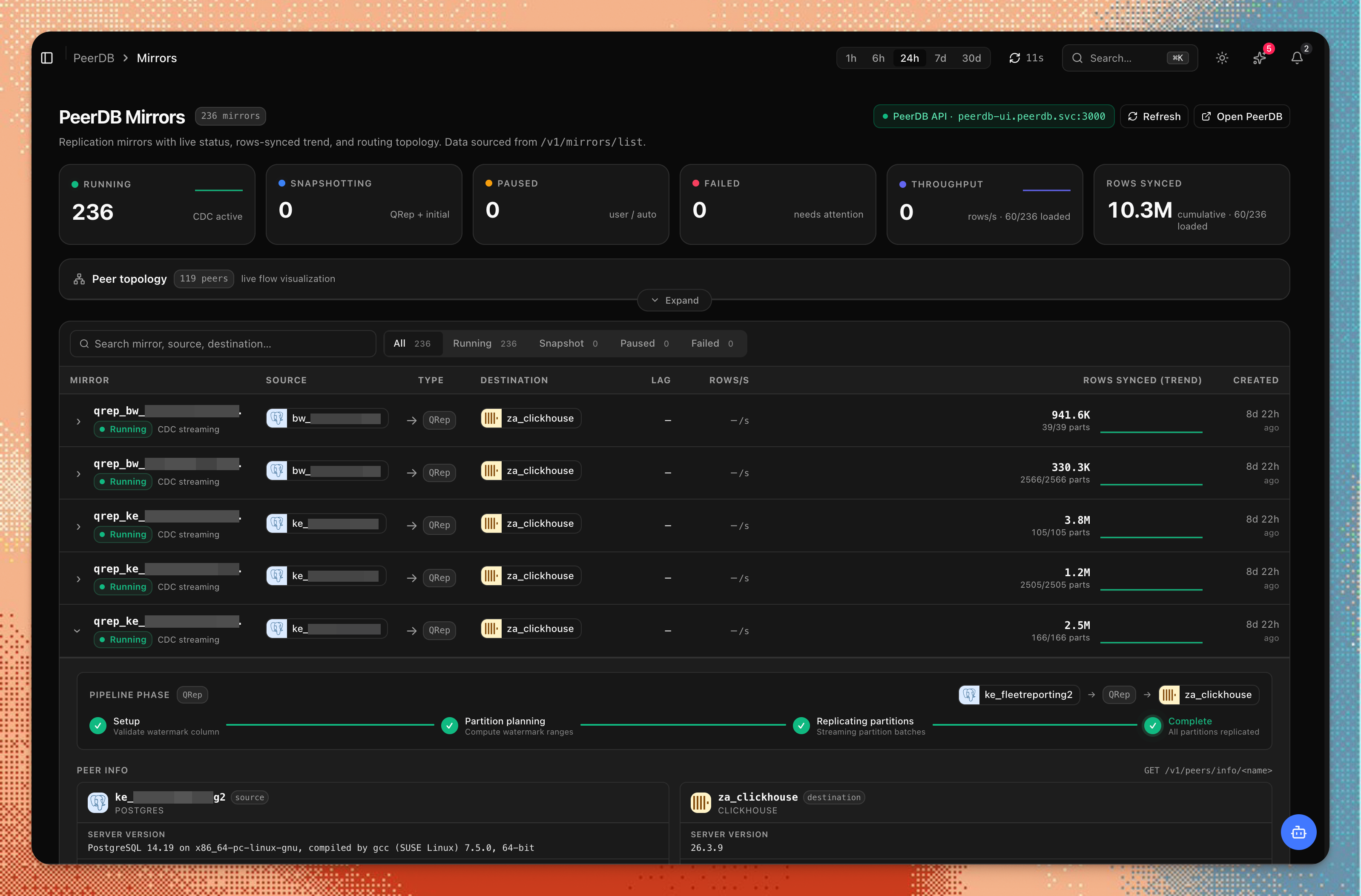
When you set PEERDB_API_URL, chmonitor adds a PeerDB section to the navigation. It proxies read-only calls to the PeerDB API so you can monitor replication without leaving the chmonitor UI.
- Mirrors (
/peerdb) shows all configured replication mirrors with status, throughput, and per-table sync state, plus a fleet lag-triage strip (worst-lag mirrors) and a collapsible logs & alerts feed aggregated across every mirror. Jobs that share a name prefix (date/version suffixes such asqrep_sg_fleetreporting1_202608) group under aprefix_*wildcard you can collapse; each group shows aggregated lag, rows/s, and rows synced. Header totals count up while per-job metrics are still loading, and last-known numbers are cached so the page paints immediately on revisit. - Mirror detail (
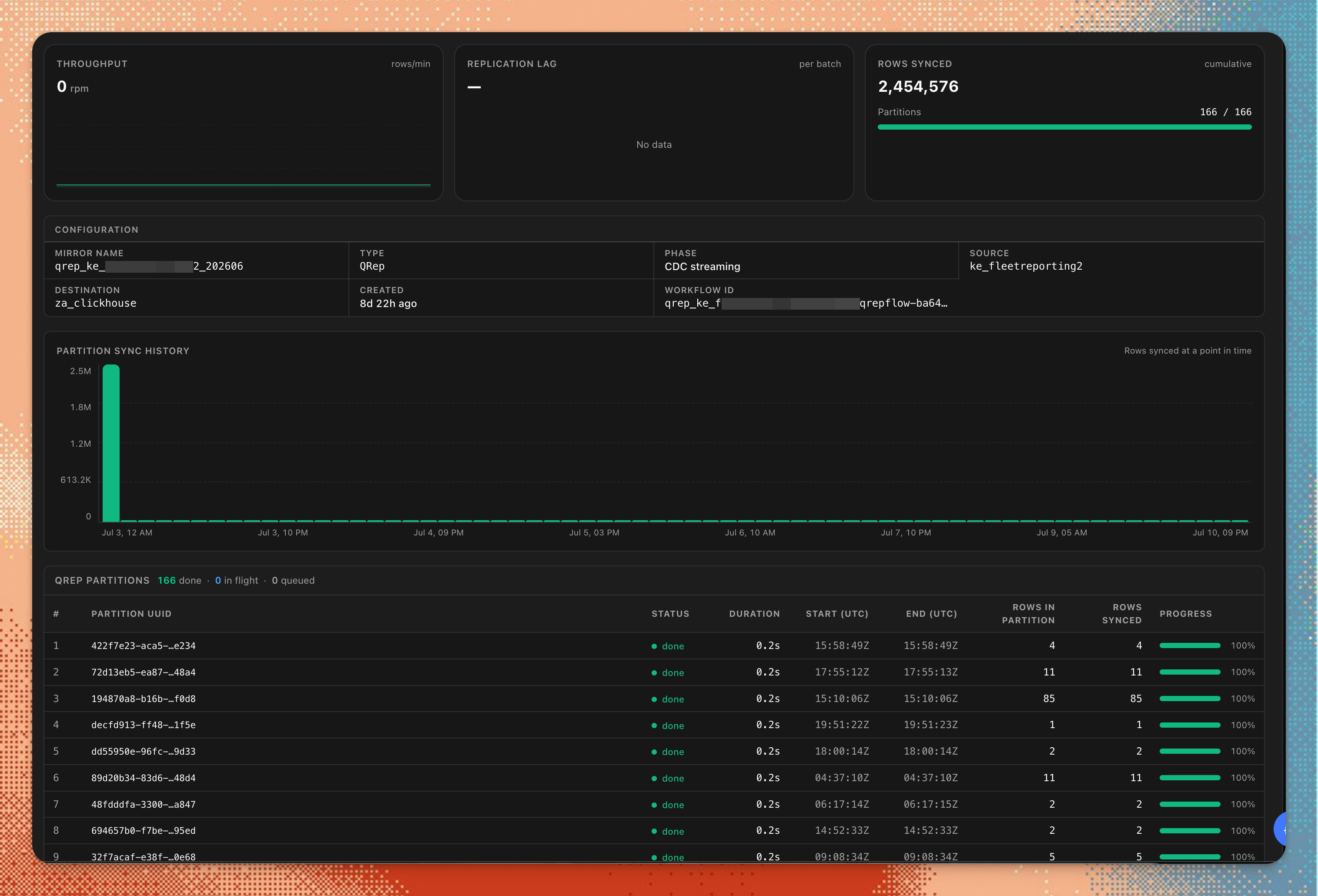
/peerdb/mirror?name=…) adds snapshot / initial-load progress (per-table partition completion, fetch/consolidate phase, avg time per partition), CDC batch history (rows per batch, LSN range, duration), a per-table operation mix (insert/update/delete), an authoritative rows-synced total, and for QRep jobs a searchable, paged partition progress table (UUID, duration, start/end, rows in partition vs synced) plus partition-sync history. - Peers (
/peerdb/peers) lists source and destination peers, a replication slot health table (lag, active state, WAL status classified ok / warn / critical), and a mirror connectivity graph. - Peer detail (
/peerdb/peer?name=…) shows the peer's redacted config and server version, its replication slots, slot-lag history, and active queries. - Fleet metrics (
GET /api/v1/peerdb-metrics) aggregates the same read-only calls into one fleet-health summary — mirror counts by status, failed/paused mirror names, CDC vs QRep split, worst replication-slot lag, and total rows synced — cached server-side for 30s. TheusePeerDBMetricshook consumes it for header KPIs and triage strips. - AI insights (
GET/POST /api/v1/insights/peerdb) surface PeerDB replication problems — failed mirrors, paused mirrors, growing slot lag, error bursts, stalled snapshots — as findings in the shared insights store (namespaced so they never mix with ClickHouse/Postgres findings). The health sweep regenerates them alongside the other engines; unconfigured or unreachable PeerDB simply yields nothing.
Mutation requests (create, delete, pause, resume) are blocked at the proxy layer and return HTTP 403. chmonitor only ever reads from PeerDB.
The PeerDB section does not appear in the navigation when PEERDB_API_URL is unset.
Pages
| Page | Route | What it shows | System tables |
|---|---|---|---|
| Mirrors | /peerdb | Mirror status, prefix groups, throughput, lag triage, fleet logs feed | — (PeerDB API) |
| Mirror detail | /peerdb/mirror | Snapshot progress, CDC batch history, QRep partition search/pager, operation mix, rows-synced total | — (PeerDB API) |
| Peers | /peerdb/peers | Peer list, slot health, mirror graph | — (PeerDB API) |
| Peer detail | /peerdb/peer | Peer info + version, slots, slot-lag history, active queries | — (PeerDB API) |
Using it
Point chmonitor at your PeerDB API
Set PEERDB_API_URL (include the /api suffix for the UI API). Add PEERDB_PASSWORD if the API requires auth:
PEERDB_API_URL=https://peerdb.example.com/api
PEERDB_PASSWORD=my-peerdb-password
PEERDB_CACHE_TTL_MS=15000
By default the password is sent as HTTP Basic auth with an empty username (the self-hosted flow-api convention). For PeerDB Enterprise / BYOC deployments that sit behind an auth proxy, set PEERDB_AUTH_SCHEME=bearer to send PEERDB_PASSWORD as an Authorization: Bearer <token> instead:
PEERDB_AUTH_SCHEME=bearer
PEERDB_PASSWORD=my-api-token
Open the PeerDB section
Once PEERDB_API_URL is set, the PeerDB section appears in the nav. Open /peerdb for mirror status, throughput, and per-table sync state.
Inspect peers and lag
Open /peerdb/peers to list source and destination peers, replication slot lag, and the mirror connectivity graph.
(Optional) Attach PeerDB per connection
Instead of the single deployment-wide PEERDB_API_URL, you can attach a PeerDB deployment to an individual saved connection (linking its Postgres source and ClickHouse destination). This needs user connections enabled.
When adding a connection, open the Advanced section and fill in PeerDB monitoring:
- API URL — the PeerDB flow-api endpoint (same value you'd put in
PEERDB_API_URL). - Auth —
None,Password(empty-user HTTP Basic), orAPI token(Bearer, for Enterprise / BYOC behind an auth proxy).
Click Test PeerDB to verify the endpoint, then save. The URL is SSRF-validated and the secret is stored only inside the connection's encrypted payload — it is never returned by the connections API.
View that connection's mirrors at /peerdb?connection=<connectionId>. When no ?connection= is present, the pages fall back to the env-wide PEERDB_API_URL.
Permissions & access
The peerdb feature id controls visibility.
CHM_FEATURE_PEERDB_ACCESS=authenticatedCHM_FEATURE_PEERDB_ENABLED=false[features.peerdb]
enabled = true
access = "authenticated"Configuration
Prop
Type
Issue alerting (read-only)
Mirror health can enter the alert lifecycle without any PeerDB mutation.
lib/peerdb/alerting.ts holds the pure core: per-mirror classification into
ok / warning / error, bounded human-readable messages on the shared
AlertPayload contract (payload value/thresholds chosen by firing reason),
validation including a title/text/label secret-leak scan, and a best-effort
alert_events audit writer. An unavailable error count is rendered as
"error count unavailable", never as "0 errors".
The runtime is lib/peerdb/alert-cycle.ts — the single orchestrator
(runPeerDBAlertCycle), wired into the health sweep after the ClickHouse
host loop. The authenticated GET /api/cron/health-sweep route bridges the
PEERDB_* Worker bindings before starting that sweep. Scheduled execution
requires CRON_SECRET and an enabled CHM_HEALTH_SWEEP_ENABLED; delivery also
requires HEALTH_ALERT_ENABLED=true. Per cycle,
lib/peerdb/alert-collector.ts collects one
read-only signal per mirror (status, ERROR-level log volume via the shared
mirror-logs contract, slot lag mapped through sourceName; max 50
mirrors, per-mirror failures isolated, never throws), then each firing
mirror goes through classify → format → validate → a best-effort
peerdb-issue audit attempt awaited before any delivery attempt →
deterministic investigation → the existing sweep dispatcher (maintenance /
quiet-hours / ACK gates, channel fan-out). Persistent alert-state dedup uses
the CHM_CLOUD_D1 hydrate/flush store when that binding is available; without
D1 it remains process-local for the lifetime of the Worker isolate. ok
signals dispatch as recoveries only when the persistent store shows a
previously firing condition and both the per-mirror status and error-log
samples were readable.
PeerDB dedups under peerdb-mirror-health:<flow> on pseudo-host -1, so
glob route patterns (peerdb-*) match and ClickHouse host keys never
collide. Delivery defaults to dry-run (audit only); the sweep arms it with
dryRun: false. A PeerDB failure can never break the ClickHouse sweep.
Pre-send investigation is deterministic by design (message revalidation,
signal-presence checks, fleet firing/slot-lag context) — the sweep never
calls an LLM. Model-driven deep dives stay available interactively through
the get_peerdb_mirror_status agent tool (requires CHM_FEATURE_PEERDB_AGENT).
The metrics/insights lane keeps a structurally compatible
PeerDBSnapshotReader for its own partial-fleet aggregation. The alert runtime
stays on the deployment-wide env source; per-connection (?connection=<id>)
alert collection remains out of scope.
Notes & limitations
Read-only by design
Any PeerDB API call that would mutate state (create/delete/pause/resume mirrors or peers) is blocked at the chmonitor proxy layer and returns HTTP 403.
- The PeerDB API URL must be reachable from the chmonitor server, not from the user's browser. All PeerDB requests are server-side proxied.
PEERDB_API_URLthat points to the bare origin (without/api) is intended for direct flow-api use; the UI mirrors/peers pages expect the/api-suffixed URL.- PeerDB version compatibility is not guaranteed across major PeerDB releases. If the PeerDB API shape changes, some fields may not render correctly.
- No ClickHouse system tables are queried by this section.
Related
Inbound Events
Ingest Alertmanager, Datadog, and generic webhook events into chmonitor — normalized, de-duplicated, retained ~30 days, and optionally re-emitted to your outbound alert routes.
Browser Connections
Add personal ClickHouse connections in the browser with AES-256-GCM encrypted credentials and server-side proxy — no config changes needed.