 chmonitor
Cluster
Monitor distributed cluster topology, replication health, and Keeper/ZooKeeper coordination state across shards and replicas.
See what nodes make up your cluster and how Keeper/ZooKeeper coordinates them — shard/replica topology, coordination health, the znode tree, and connection history.
Prop
Type
What it does
The Cluster section answers two questions: what nodes make up your cluster, and how is Keeper/ZooKeeper coordinating them?
The Clusters page renders an interactive topology map of every shard and replica pulled from system.clusters. Use it to confirm shard layouts, spot misconfigured hosts, or audit cluster membership after a scaling event.
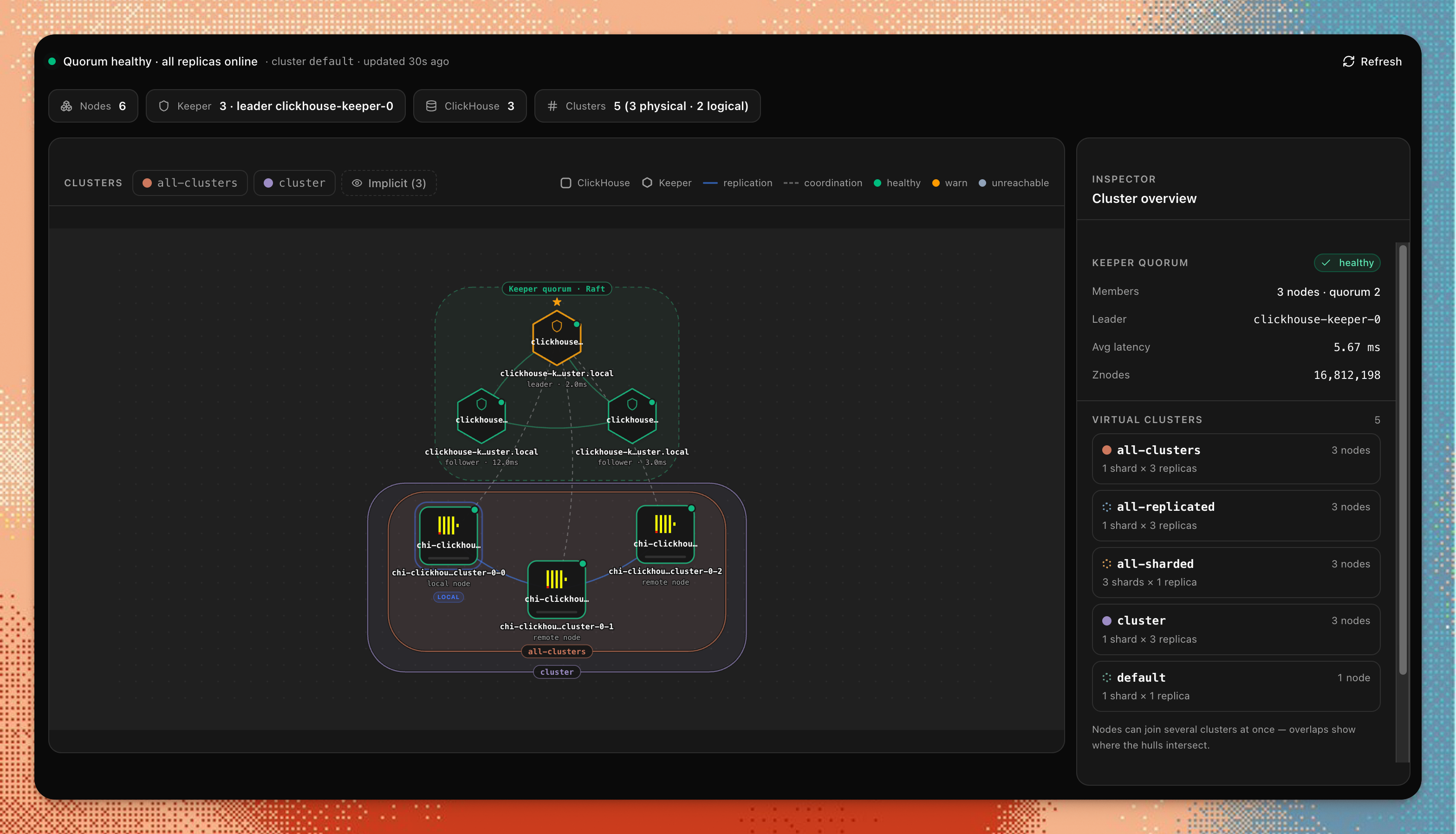
The Keeper sub-section shows the ZooKeeper/ClickHouse Keeper coordination layer: node health, liveness, request latency, the znode tree, active watches, and connection history. These pages are only available when your ClickHouse server has Keeper or ZooKeeper configured.
Pages
| Page | Route | What it shows | System tables |
|---|---|---|---|
| Clusters | /clusters | Interactive topology map, shard/replica membership | system.clusters |
| Keeper Overview | /keeper/overview | Liveness, request load, latency, per-node cluster state | system.zookeeper_info |
| Data Browser | /keeper?path=/ | Browse the znode tree | system.zookeeper |
| Keeper Info | /keeper/info | Per-node role, raft log, znode counts, latency | system.zookeeper_info |
| Connections | /keeper/connections | Live connections from this server to Keeper | system.zookeeper_connection |
| Connection Log | /keeper/connection-log | History of connect/disconnect events with reasons | system.zookeeper_connection_log |
| Request Log | /keeper/log | Per-request log of Keeper operations and responses | system.zookeeper_log |
| Watches | /keeper/watches | Currently active watches registered by this server | system.zookeeper_watches |
Using it
- Open
/clustersfor the interactive topology map — confirm shard layouts, spot misconfigured hosts, or audit membership after scaling. - Start Keeper triage at
/keeper/overviewfor liveness, request load, and latency across nodes. - Browse the znode tree at
/keeper?path=/, and drill into per-node role and raft log at/keeper/info. - Check
/keeper/connectionsfor live connections,/keeper/connection-logfor connect/disconnect history,/keeper/logfor per-request operations, and/keeper/watchesfor active watches.
Keeper pages appear automatically when system.zookeeper_info is accessible on the connected host. If the table is absent (no Keeper configured), pages show an empty state rather than an error.
Permissions & access
All Cluster pages use the cluster feature id.
CHM_FEATURE_CLUSTER_ACCESS=authenticatedCHM_FEATURE_CLUSTER_ENABLED=false[features.cluster]
enabled = true
access = "authenticated"Configuration
No feature-specific configuration. Keeper pages appear automatically when system.zookeeper_info is accessible on the connected host. If the table is absent (no Keeper configured), pages show an empty state rather than an error.
Notes & limitations
Keeper tables are optional
system.zookeeper, system.zookeeper_info, system.zookeeper_connection, system.zookeeper_connection_log, system.zookeeper_log, and system.zookeeper_watches only exist when ClickHouse Keeper or ZooKeeper is configured. Pages backed by a missing table show an informational empty state rather than an error.
system.zookeeper_logrequires<zookeeper_log>to be enabled in the ClickHouse server config.- The topology map requires
system.clustersand correctly populatedhost_name/portvalues. Clusters defined only inremote_serverswith unresolvable hostnames still appear but may lack connection metadata. - The Connections page shows live connections at query time; historical data is in the Connection Log.